
Medication. Reminder app and medication log.
One list for everything you take. Reminders at your times, every dose logged in two taps, the as-needed ones too.
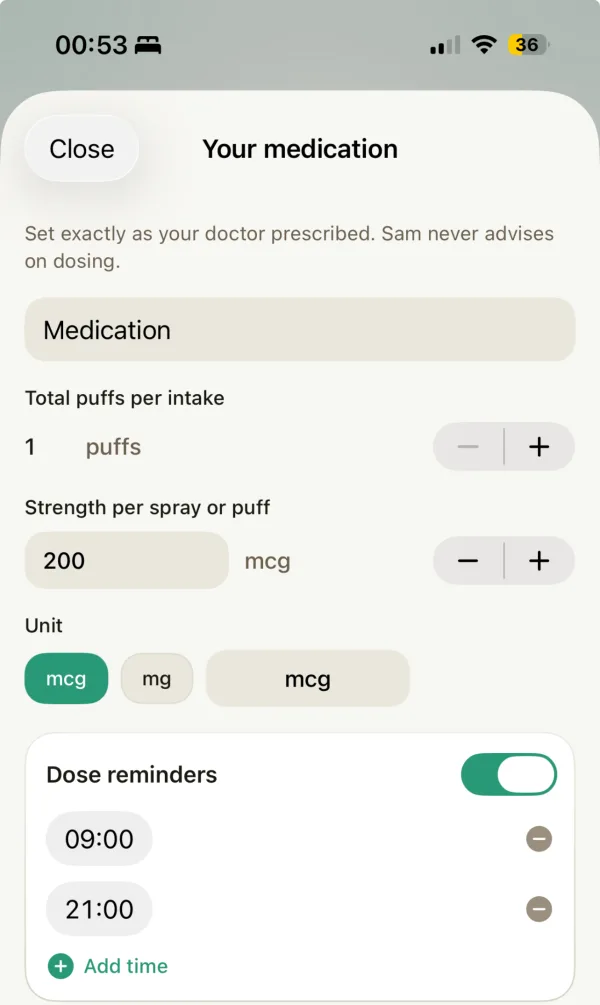
One list per person, independent of your programs. Daily, every few weeks or months, or as needed, with a reminder at each dose time. Sam reminds and records, gives no dose advice and does not replace a medication plan.
One list. Reminders at your times.
One list for everything you take
Daily, every 1 to 12 weeks or months, or as needed, in one list that belongs to you and not to a program. Search by name or active ingredient.
Taken or skipped from the reminder
For daily medications: one reminder per dose time, never with a dose. Mark Taken or Skipped right from the notification.
As needed, logged the same way
A medication you take only when needed? Tap the Medications chip on the Today tab and the dose goes on record.
Next to your symptoms
In the migraine, reflux, gout, asthma and hay fever diaries you save an as-needed dose together with the entry. For daily medications, your program's doctor report shows the regimen and, depending on the program, adherence and the last 30 days.
Into the doctor report of your program.
The doctor report of a program lists the medications linked to it, with their regimen and the doses you logged. The list itself is not exported on its own.
Symptom days
Medication taken
Sleep
In your own words
A summary of your own entries. Your doctor interprets it.
How do I set up the medication reminder?
You build the list once.
- Open Medications from the chip on the Today tab or from the Doctor's Corner.
- Search by name or active ingredient, or type your own name.
- Choose the strength and your times, an interval, or "As needed".
- Sam reminds you at each dose time, or on the due day for an interval.
How do I log a dose?
Two taps in the app, or none in the app.
- Open the Medications chip on the Today tab.
- Tap the medication to log it as taken. An undo toast stays on screen briefly.
- For daily medications, mark Taken or Skipped right from the reminder notification.
- As-needed doses are logged the same way.
Not daily: every few weeks or months
A medication you do not take every day gets its own rhythm in Sam.
- Add the medication and choose Other under How often.
- Set weeks or months, for example once a week or every 4 weeks, and the time of day for the reminder.
- On the due day Sam reminds you at the time you chose. Tapping the reminder opens the medication sheet on the Today tab.
- Log the day you had it there. The next due day counts from the last day you logged. Skipped does not move it.
What Sam does not do
- No interaction check, no advice on doses or side effects. Ask your practice or pharmacy.
- Not a medication plan: Sam's list does not replace the plan from your practice, and there is no scanning.
- Daily, every 1 to 12 weeks or months, or as needed. No fixed weekdays, tapering or courses with an end date.
- No standalone export. Medications appear in the doctor report of their program.
More in Sam
Questions about the medication reminder
Can't find your answer?
Can't find what you're looking for? Send us a message and we'll get back to you.
Contact SupportIs Sam a medication reminder app for iPhone?
Yes. Sam runs on iPhone and keeps one medication list per person. You set daily times, a repeating interval, or mark a medication as needed. For daily times Sam reminds you once per dose time, and you log each dose in two taps. Sam only records and reminds. It gives no advice on doses.
Does Sam offer an Android medication reminder?
No, not at the moment. Sam runs on iPhone. If you use Android, another medication reminder app fits better. See our comparison with medication reminder apps.
Is the medication list free?
Yes. The medication list, logging and reminders are free and unlimited. Medical programs are separate: the free plan includes one medical program at a time, and further programs and their reports are part of Pro. See the pricing page.
How do I log an as-needed (PRN) medication?
Add the medication as "As needed" instead of giving it times. When you take a dose, open the Medications chip on the Today tab and tap the medication. In the diaries of the migraine, asthma, hay fever, reflux and gout programs, the as-needed medication you took can be saved with that entry. Sam records the dose and the time and judges nothing.
Is there a medication log app?
Yes. Sam keeps your medication log: every dose recorded in two taps, the as-needed ones too. Whether paper, a template or an app fits you better is covered in Medication Log: Template or App.
Is Sam a medication and symptom tracker?
Yes. In the diaries of the migraine, reflux, gout, asthma and hay fever programs you save an as-needed dose together with the entry. Outside these programs, the symptom diary and your medication list sit side by side on the Today tab. Sam records both and judges neither.
Can I enter several medications and several times a day?
Yes. There is no cap on the list. Each medication can have one or more daily times, or repeat every 1 to 12 weeks or months. A repeating medication gets a reminder on the due day, at an hour you choose. Fixed weekdays, tapering plans and courses with an end date are not available.
Is there a weekly medication reminder app for something I take once a week?
Yes, Sam works as a weekly medication reminder. Under How often choose Other and set one week. Sam reminds you on the due day at your chosen time. You do not pick a fixed weekday: the next due day counts from the last dose you logged as taken. Sam reminds and records. Your practice decides how often you take a medication. The setup step by step is in Weekly medication reminder app: repeat every 4 weeks.
Is there a monthly medication reminder, for example every 4 weeks or every 12 weeks?
Yes. A medication can repeat every 1 to 12 weeks or months, such as every 4 or 12 weeks. The reminder arrives on the due day, and the next due day counts from the last day you logged. If you log a dose later, pick the day you had it. A skipped dose does not move the due day. Whether your schedule should change after a late dose is a question for your practice or the package leaflet. See Injection every 4 or 12 weeks.
How does the reminder work for medication I do not take every day?
It is separate from the daily reminders and arrives on the due day. If the dose is still not logged, Sam can plan it again for the same time on the following days. Tapping it opens Sam's medication sheet on the Today tab, where you log the day. The reminder itself has no buttons such as Taken or Skipped. Medications imported from Apple Health get no repeating schedule.
Does Sam's list replace the medication plan from my doctor?
No. Sam's list is your own personal list. It does not replace a medication plan or list from your doctor or pharmacy, such as the standardised Medikationsplan in Germany (section 31a SGB V), which your doctor issues and your pharmacy can update on request. Sam does not scan it. You can keep a photo or PDF of it in the Health Vault.
Can I import my medications from Apple Health into Sam?
Yes, from iOS 26. Choose "Import from Apple Health" in onboarding after "Yes, add them" or on the Medications screen. In Apple's sharing sheet you pick which medications Sam may read. Imported medications stay managed in Apple Health: Apple reminds you, you log doses there, and Sam shows those doses. A program's Doctor's Report lists only medications you add in Sam. More in the comparison with Apple Health and in Apple Health Medications in Sam.
How is this different from Apple's own Medications feature?
Apple's Health app has a Medications feature with reminders and logging. Sam keeps its list next to your symptom diary and shows the medications in the Doctor's Report of your program. You can use both. More in the comparison with Apple Health and the comparison with medication reminder apps.
What happens when my dose or prescription changes?
When your doctor changes the dose or times, update them in Sam. The change applies from today and earlier days keep the old plan. When a daily medication is stopped, enter the stop date: Sam stops reminding you and the history stays. If you take it again later, "Take again" adds it as a new entry.
Can my relatives see my medication?
Only if you choose to share. In the Friends & Family you decide which medical programs a person can see, read-only. Of your medication, they see only the daily medications linked to those programs, and they cannot edit your list. Every person keeps their own list in their own account.
Does Sam check for interactions?
No. Sam does not check interactions, gives no advice on dose or timing and has no information on side effects. Ask your doctor or pharmacist. If you missed a dose, the package leaflet or your doctor or pharmacist tells you what to do.
What does the Doctor's Report show about my medication?
For each daily medication linked to the program, the report lists the regimen and, depending on the program, the doses taken as scheduled and counts of adjusted, skipped, missed and extra doses, with a 30-day overview. The migraine report counts the days with as-needed medication. Your program diary sits right beside it. How the report is made is explained on the Doctor's Report page.
Which medical programs use the medication list?
High blood pressure, epilepsy, gout, asthma, acid reflux and hay fever read from the same list. The migraine program links the as-needed attack medication you log in the attack diary and also records preventive medication you take daily or at repeating intervals. Its doctor report counts the days with acute medication, shows the doses taken as scheduled for a daily preventive and lists the logged dates for one taken at repeating intervals.
Take
care.
Sam is a wellness companion, not a medical device. It does not diagnose, treat, cure, or prevent any disease or health condition. Always consult a qualified healthcare professional for medical decisions.