Comparison
Medication reminder apps: what Sam does and does not do.
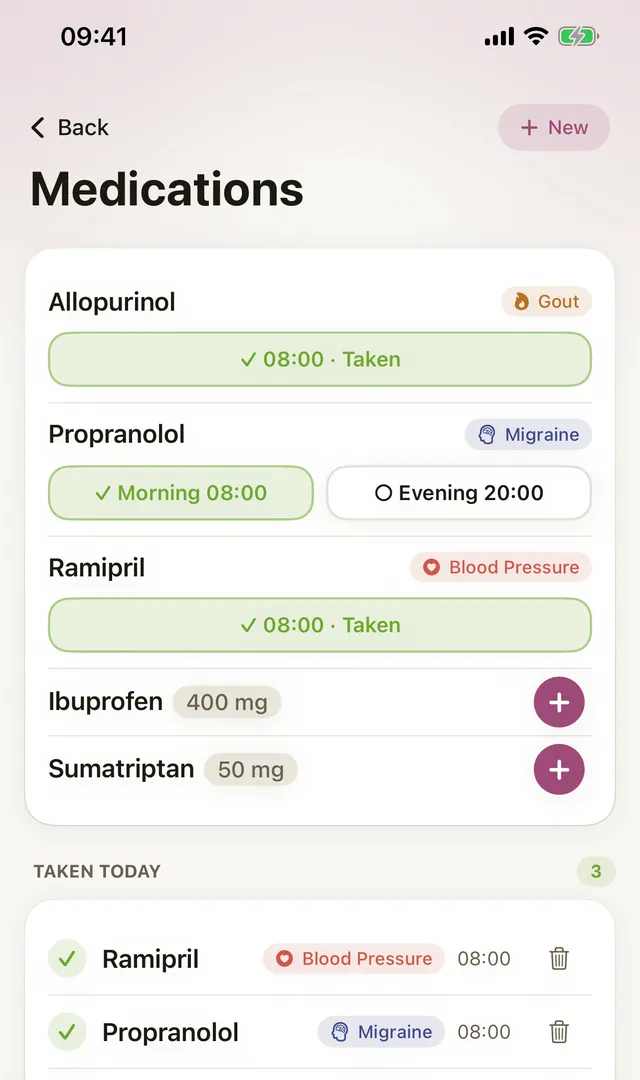
A reminder app tells you when a dose is due and records that you took it. Sam keeps one medication list per person, shown in your program's doctor report.
Try Sam for freeCompared by kind of app, with named apps in the questions below. Checked on 2 November 2026.

Our verdict. We make Sam, so weigh it.
For one of the eight conditions, your medication routine and your doctor, we pick Sam. For interaction information, or someone who hears about a missed dose, a dedicated reminder app fits better.
Which one should you pick?
Both remind you and keep a log. The difference is what the log is for.
Reminder apps
The reminder is the whole job.
Built around the dose.
Pick a reminder app if ...
- you want interaction information.
- you want a family member or caregiver connected to your reminders.
- you use Android.
Sam
Your medications sit next to your diary.
One list, one report per program.
Pick Sam if ...
- you want your own medication routine next to your diary and in your doctor report.
- you want the doctor report of your program to include your medication.
- you have one of the eight conditions and want its monthly check-in too.
What you get with each.
| Sam | A typical reminder app | |
|---|---|---|
| Several medications in one list | Yes, one list per person | Yes |
| Scheduled and as-needed | Scheduled or as needed | Varies |
| Reminder at the time you set | One banner per dose time, naming all medications due | Yes, that is their job |
| Mark from the notification | Taken, Adjusted or Skipped (daily doses) | Usually |
| Interaction information | No | Varies by app and region |
| Someone hears about a missed dose | No; Friends & Family is read-only sharing you choose | Some apps connect a family member or caregiver |
| Own diary for each condition | Eight conditions, medications linked in seven | Varies |
| Doctor report with your medication | Report per program includes linked medications | Varies, many offer a report or export |
| Platforms | iPhone | Varies, many offer iOS and Android |
| Apple Health values next to entries | Yes, with an Apple Watch | Varies |
Typical means: many reminder apps work like this, not all of them. Named apps are covered in the questions below. A tick means yes, an empty ring means partly, no or it varies.
Before you rely on a reminder.
Keep a current list.
Write down all your medications, over-the-counter ones too, with name and strength as on the pack. In Sam this is your medication list in Doctor's Corner. Ask your practice or pharmacy if you are unsure.
Set the times.
Set the reminder the way your practice told you. An app records it; it does not change it.
Look back at your appointment.
See how often a dose was missed and say so openly. That is useful for your practice, not something to be embarrassed about.
Source: the public pages and store listings of Medisafe, MyTherapy and mediteo, retrieved on 2 November 2026. Details may have changed. We are not affiliated with them. Medisafe, MyTherapy and mediteo are trademarks of their respective owners. Sam does not diagnose and gives no treatment advice.
Pages checked: Medisafe on Google Play, Medisafe on the App Store, mytherapyapp.com, mediteo: app features
Questions about reminder apps and Sam
Take care.
Bring your record to the appointment. If a diary with a doctor report matters to you and the reminder is only part of it, take a look at Sam.
Sam is a wellness companion, not a medical device. It does not diagnose, treat, cure, or prevent any disease or health condition. Always consult a qualified healthcare professional for medical decisions.