
Symptom diary. For your doctor visit.
Tap what you feel, how strong it is and where. Sam keeps the days, so at your next appointment you're not guessing three weeks back.
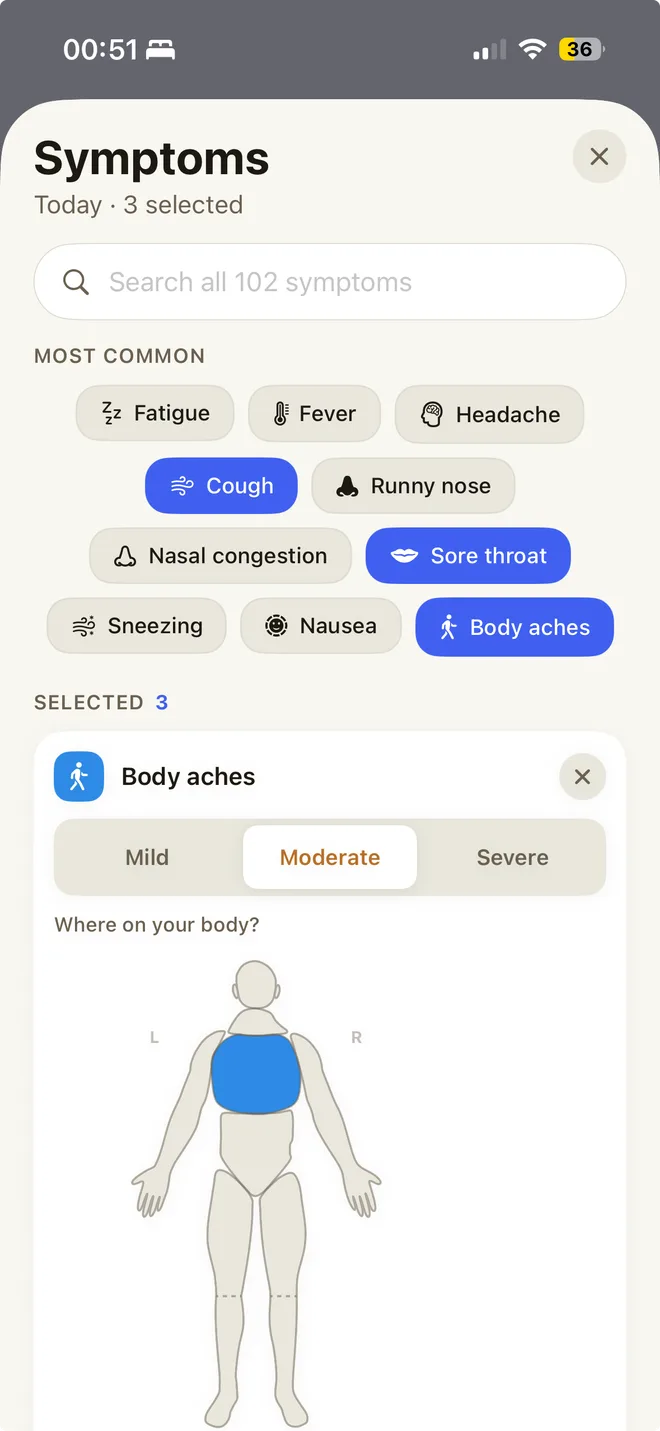
A symptom diary keeps what you felt, when, how strong it was and where. In Sam you log a day in a few taps, and in one of the eight medical programs also the attacks, flares or symptom days of your condition. Sleep and activity from Apple Health sit beside them in the report. At your appointment you show your entries in the app or bring the Doctor's Report as a PDF, so you are not guessing three weeks back. Sam does not interpret your entries and does not replace a conversation with your doctor. The same entries work without a diagnosis while you wait for an appointment.
Log it on the day. Have it when you're asked.
102 symptoms, a few taps
Tap the common ones or search them all, and add your own under Other. A cold that lasts all week? Apply it to several days at once.
How strong, and where
Mild, moderate or severe. Mark the spot on a body outline, and add your temperature when you have a fever.
Sick days and drinking days
Mark a sick day and add a photo of a test or your sick note, filed in your Health Vault. A drinking day takes one tap.
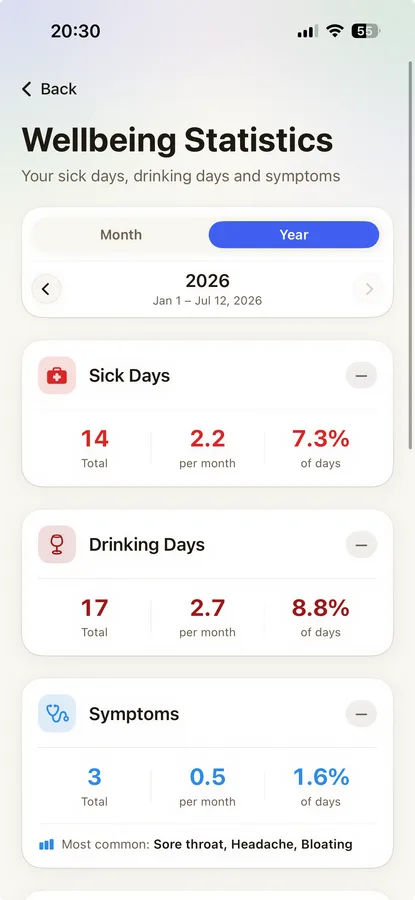
Your month, on one page.
Your monthly report gives symptoms a page of their own: symptom days, days without, the ones you logged most and your drinking days. Follow a condition program, and its diary of attacks, flares or symptom days goes into the Doctor's Report you bring to your appointment.
How do I log a day?
An entry takes a few taps.
- Open the symptoms for the day in Sam.
- Tap the symptoms you had, or search all 102. Add your own under Other.
- Set the strength to mild, moderate or severe.
- Mark the spot on the body outline.
- If a cold lasts all week, apply the entry to several days at once.
How do I bring my symptom diary to the doctor?
It depends on whether you use a medical program, which you start after you have confirmed a diagnosis with your doctor. Without a program, you show your entries in the app.
With a program: Doctor's Report as a PDF
- Open the Doctor's Report of your program.
- Choose the period: 1, 3, 6 or 12 months, or the whole record. The default is 3 months.
- Read the report through in the app.
- Share the PDF or print it.
Without a program: show your history in the app
- In Sam, open the Wellbeing tab and tap History. In the Health history, a dot marks every day with symptoms.
- Tap Symptoms on a day. Your doctor sees the entries with strength and body spot, as far as you entered them.
- You create the monthly report yourself. It has a Lifestyle & Symptoms page and needs no program.
What Sam does not do
- Sam does not interpret your entries or tell you what a symptom means. You clarify that with your doctor.
- Sam measures nothing itself. Sam does not measure blood pressure either.
- There is one Doctor's Report per program, not one combined report for several conditions.
- There is no blank template to print. You can print the finished Doctor's Report and the monthly report.
More in Sam
Questions about the symptom diary
Can't find your answer?
Can't find what you're looking for? Send us a message and we'll get back to you.
Contact SupportI don't have a diagnosis yet and I'm waiting for an appointment. Is the symptom diary still for me?
Yes. The symptom diary works without a diagnosis and without a program. You log what you feel, how strong and where, and show the trend in the app or bring the monthly report. A program with its own doctor's report starts only after a doctor has confirmed the diagnosis.
What should a symptom diary include?
When you tell your doctor how you have been, three details help: how often, how strong and when. The date, the symptom, its strength and the spot on your body are enough, plus your temperature for a fever. That is exactly what Sam asks for. A short entry every day is worth more than a long one every two weeks.
I was looking for a printable symptom diary template. Is this that?
It does the same job with less writing. You log a day in a few taps instead of filling in columns. You can print the Doctor's Report and the monthly report; there is no blank template.
Is there a diary for my condition?
If you follow a condition program, yes: attacks for migraine, seizures for epilepsy, panic attacks for panic disorder, flares for gout, episodes for reflux, attacks and reliever use for asthma, symptom days for hay fever. That diary goes into the Doctor's Report.
How long should I keep a symptom diary?
Your doctor decides that. In Sam's Doctor's Report you set the period to 1, 3, 6 or 12 months, or the whole record.
Can I share my symptom diary with my family?
Yes, through Friends & Family. You choose the person and switch on the symptoms area. They see it read-only in their own Sam app, and you can end the share at any time.
Does Sam tell me what my entries mean?
No, and that's on purpose. Sam keeps and sorts what you logged. What a symptom means is for your doctor to say.
Is Sam a medical device?
No. Sam is a wellness companion. It documents what you enter and puts it together for your conversation with your doctor. It makes no diagnosis and gives no treatment advice.
Where do sick days and drinking days go?
Mark a sick day and add a photo of a test or your sick note. A drinking day takes one tap. Both get a page of their own in the monthly report, which you create yourself.
Can I track menopause symptoms in the symptom diary?
Yes. Hot flashes, night sweats and fatigue are logged per day with intensity, sleep changes or mood changes as present. Sleep and resting heart rate from Apple Health sit in the same app. The diary documents your course and helps prepare a conversation with your doctor. It does not diagnose and does not tell you whether you are in menopause.
Take
care.
Sam is a wellness companion, not a medical device. It does not diagnose, treat, cure, or prevent any disease or health condition. Always consult a qualified healthcare professional for medical decisions.