On this page
TL;DR
Apple Watch has two distinct automatic safety features that can call emergency services without you initiating the call. Fall Detection triggers after a hard fall: if you are immobile for approximately one minute, a 30-second countdown leads to an automatic emergency call. Crash Detection triggers after a severe vehicle crash: a 10-second alert period followed by a 30-second countdown. Both features use the accelerometer, gyroscope, and motion algorithms to detect characteristic sensor signatures. Neither can detect every fall or crash - they are designed for high-impact events. Fall Detection auto-enables for users 55 and older; Crash Detection is on by default for compatible watch models. Apple Watch Ultra 3 adds satellite-based emergency communication when cellular coverage is unavailable.
Fall Detection: what it is and how it works
Fall Detection is available on Apple Watch SE or later, Apple Watch Series 4 or later, and all Apple Watch Ultra models. It uses the accelerometer and gyroscope to identify the motion signature of a hard fall - a sudden sharp impact followed by the wrist movement pattern of someone falling.
When a hard fall is detected, Apple Watch immediately taps your wrist, sounds an alarm, and displays an alert. At this point, the response depends on whether you are moving.
If you are moving: Apple Watch detects activity and waits for you to respond. You can dismiss the alert by tapping "I'm OK" or by tapping Close in the upper-left corner of the screen. If you need help, you can drag the Emergency Call slider.
If you are immobile for approximately one minute: Apple Watch begins a 30-second countdown. During the countdown, it taps your wrist repeatedly and increases the alarm volume, so that you or someone nearby can hear it. You can cancel the countdown at any time. If the countdown completes without a response, Apple Watch automatically calls emergency services.
When the automatic call connects, Apple Watch plays a looped audio message - at full volume initially, then reduced - informing emergency services that it detected a hard fall and providing your location as latitude and longitude coordinates. If you have Medical ID configured and have enabled the Share During Emergency Call setting, your Medical ID is also shared automatically (this is available in the United States, Canada, the United Kingdom, and Ireland). After the call, your emergency contacts receive a text message with your location.
Falls are recorded in the Health app. If Apple Watch alerts you after a detected fall and you respond that you did not fall, the event is not recorded. To review past fall events, go to Health → Browse → Other Data → Number of Times Fallen.
Fall Detection settings
To check or change Fall Detection settings on iPhone, open the Apple Watch app, tap My Watch, tap Emergency SOS, then toggle Fall Detection. You can set it to Always On or to Only On During Workouts. The workout-only setting means Fall Detection is active only when a session is running in the Workout app.
Fall Detection turns on automatically if your age in the Health app or Apple Watch setup is 55 or older. It is available only for users 18 and older.
One important system requirement: Wrist Detection must be on for Apple Watch to automatically call emergency services. If you have disabled Wrist Detection - which is done in Settings → Passcode → Wrist Detection - the watch will alert you but will not auto-call.
Crash Detection: what it is and how it works
Crash Detection is designed to identify severe motor vehicle crashes - front-impact, side-impact, and rear-end collisions, and rollovers - in sedans, minivans, SUVs, pickup trucks, and other passenger cars. It uses the accelerometer, gyroscope, and barometer alongside the microphone in a paired iPhone to detect the characteristic sensor profile of a severe crash, including the sudden deceleration pattern and the loud sound levels associated with a collision.
Crash Detection is available on Apple Watch Series 8 or later, Apple Watch SE (2nd generation) or later, and all Apple Watch Ultra models - all running watchOS 9 or later. It also requires a paired iPhone 14 or later. This makes Crash Detection more restricted than Fall Detection: Series 4-7 and SE (1st generation) do not support it, and it cannot function standalone without a compatible iPhone.
Here are both sequences side by side, as Apple describes them:
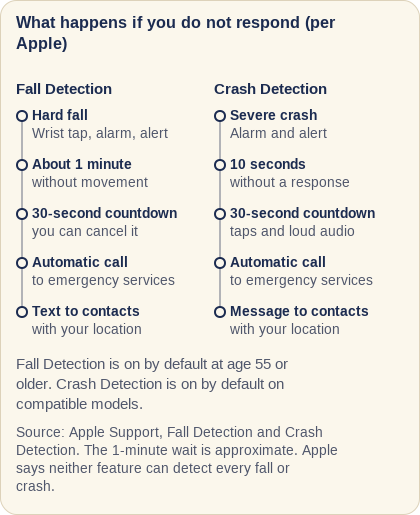
After a crash, the first 10 seconds let you swipe the Emergency Call slider or dismiss the alert if you are uninjured. Without a response, a 30-second countdown with wrist taps and loud audio follows, then the automatic call. Its looped audio message describes the crash and gives your estimated latitude and longitude with a search radius. Afterwards your emergency contacts receive a message with your location. Apple also states that these features cannot detect every fall or crash; the next section covers the limits.
Crash Detection is on by default for compatible watch models. It can be turned off in the Apple Watch app on iPhone → My Watch → Emergency SOS → Call After Severe Crash. Turning it off on one paired device automatically turns it off on all other paired devices.
What these features cannot do
Both features come with an explicit Apple disclaimer worth understanding:
- Apple Watch cannot detect all falls.
- Crash Detection cannot detect all car crashes.
Fall Detection looks for the motion signature of a hard fall. Minor stumbles, slow falls onto soft surfaces, or falls where the watch's motion data does not match the expected pattern will not trigger it. Conversely, Apple notes that high-impact activities - certain sports or gym movements - might trigger a false alert.
Crash Detection is designed for severe vehicle crashes. Low-speed collisions, cycling accidents, and crashes in vehicle types not included in its detection model will not trigger it. Its sensor algorithm is specifically calibrated for the sudden deceleration and noise profile of severe passenger-car impacts.
Neither feature is a substitute for a personal alarm system, medical alert device, or other dedicated safety technology designed specifically for fall or medical emergency detection.
Satellite: Apple Watch Ultra 3 and iPhone 14
Both Fall Detection and Crash Detection can use Emergency SOS via satellite to reach emergency services when cellular and Wi-Fi coverage are unavailable. For Fall Detection, this applies to Apple Watch Ultra 3 and iPhone 14 or later. For Crash Detection, iPhone 14 or later can reach satellites; Apple Watch Ultra 3 can also use satellite for Crash Detection. All other Apple Watch models require cellular or Wi-Fi Calling with an internet connection from the watch or a nearby iPhone.
Satellite availability is limited to certain countries and regions. Apple maintains a list of supported locations in their satellite features documentation.
Privacy: what sensor data is stored
For Crash Detection, Apple states that all sensor data used to detect crashes is processed on the device and discarded after detection - it is not sent to Apple unless you explicitly opt in to sharing data to improve the feature. The iPhone microphone is used to detect loud sound characteristic of a crash, but raw audio is never collected or stored for Crash Detection purposes. If a crash is detected and emergency services are called, your device shares your location as coordinates - regardless of your Location Services settings - for the duration of the emergency.
Fall Detection records fall events in the Health app when they occur (and you do not dismiss them as non-falls), but the accelerometer data used to trigger detection is not retained.
In Sam
Log your daily Apple Watch data in Sam and take it to your appointment
After a fall or a scare, you can show your doctor how your weeks looked, not just the one event.
- Instead of Apple Health alone: Sam shows heart rate, resting heart rate, HRV and steps as a trend over a day, week, month or six months, next to your personal baseline.
- Instead of one remembered event: you can switch on an optional walking group in Sam, which shows walking steadiness, speed and step length from Apple Health over time.
- Instead of loose screenshots: you create the monthly report yourself and take it along as a PDF with sleep, stress, activity and the symptoms you logged.
Sam does not show Fall or Crash Detection events and is not an emergency feature.
Sam is a wellness companion, not a medical device. No diagnosis, no replacement for medical advice.
Related reading
More on recording and taking it along
Sources
- Use Fall Detection with Apple Watch - Apple Support, updated March 2026. Accessed 16 May 2026.
- Use Crash Detection on iPhone or Apple Watch to call for help in an accident - Apple Support, updated December 2025. Accessed 16 May 2026.