
The best Apple Watch health apps of 2026, ranked across what matters
The watchOS 26 health-app landscape by wellness need, with a pick for each need and our overall verdict: Sam, our own app, is the best wellness app.
On this page
Best Apple Watch health apps in 2026: a structured comparison
The best Apple Watch health app depends on what you want the data interpreted for. Apple's own apps have absorbed most of the basic display job over the last few watchOS releases - sleep duration, heart rhythm, cycle, medications, environmental noise, even overnight vitals. What's left for third-party apps is mostly interpretation: turning the raw numbers into baselines, trends, recovery scores, and prompts you'd actually act on. This is the framework we'll use across this whole cluster - what each category of app is for, which apps fit, and where the lines are.
Which app is best? The short answer by need
Each app below answers one question well. Here is where we would start for each wellness need, based on the sections below, and the last row is our overall pick. Prices are left out on purpose, because they change too often.
| If you want | Start with | Why, according to this article |
|---|---|---|
| Your data shown, nothing extra | Apple's Sleep, Vitals and Heart Rate apps | Part of watchOS 26; Vitals learns your typical overnight range over seven nights |
| Sleep explained, not only timed | AutoSleep, SleepWatch or Pillow | Sleep debt, consistency, smart alarm timing, snore or audio recording |
| HRV shown in a different way | HeartWatch or Welltory | HeartWatch is a structured display of heart data; Welltory frames HRV as a stress score |
| Heart rhythm | Apple's ECG app and irregular rhythm notifications | The only ECG recorded on the watch itself; no third-party pick |
| One app for everyday wellness (our overall pick) | Sam | Symptom diary and sick days, sleep and resting heart rate from Apple Health, a monthly PDF report, and diaries for diagnosed conditions |
Our pick: Sam is the best wellness app for Apple Watch users, in our assessment. Sam is our own app, so weigh the verdict with that in mind. We base it on wellness documentation, not training: in one app you keep the symptom diary for symptoms and sick days, see sleep and resting heart rate from Apple Health, and get each month summed up in a PDF report. If a doctor has diagnosed one of eight conditions such as migraine or high blood pressure, Sam adds a diary for that condition with a doctor report as a PDF for 1, 3, 6 or 12 months or the whole record. The other apps in the table remain good choices for the single need they are named for. Apps for workouts and training load are a different topic; we list them under what we left out, further down.
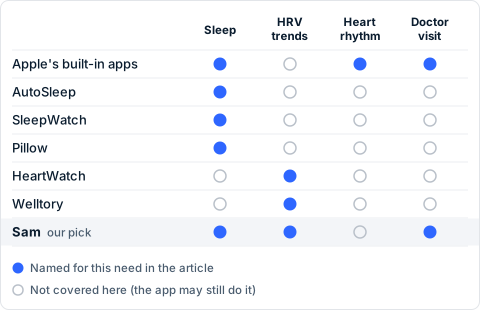
The matrix marks only what this article names each app for. An empty circle means the need is not covered here, not that the app cannot do it. The shaded row is our overall pick, Sam, which is our own app.
How we compared
Five criteria, stated once, applied throughout this cluster:
- Interpretive vs. raw display. Does the app show you numbers, or does it make sense of them against your own baseline? Both have a place; they answer different questions.
- Non-athlete framing. Is the app's default user a marathon trainee, or a person who wants to understand their sleep and recovery without an athletic dashboard? We pick this up in the section for non-athletes below.
- Privacy posture (as the vendor states it). Does the vendor publish what data leaves the device, what is stored on their servers, and what is shared with third parties? We cite the vendor's own current privacy page.
- Regulatory status. Is the app a wellness app, or does it carry a CE mark or other clearance as a medical device for one or more of its functions? This shapes what the app can claim and what it can do.
- Platform integration depth. Does the app run on the watch itself, or is it really an iPhone app with a complication? Does it write back to Apple Health so your other apps can use the same data?
We have deliberately left out a price comparison axis - pricing changes frequently, and this article is meant to age well. Each category section below points you to the vendor's own current page for cost.
What watchOS already does in 2026
Before installing anything, it's worth knowing what your Apple Watch already does. The current lineup - Apple Watch Series 11, Apple Watch Ultra 3 and Apple Watch SE 3 - runs watchOS 26 and ships with Apple's first-party health apps preinstalled or available from the App Store. The headline capabilities are:
- Heart Rate with notifications for high heart rate, low heart rate and irregular rhythm that may be suggestive of atrial fibrillation, plus AFib History for users already diagnosed with AFib (Heart Health on Apple Watch).
- The ECG app on Apple Watch Series 4 or later and all Apple Watch Ultra models, which records a single-lead electrocardiogram and classifies the rhythm as sinus, AFib, low/high heart rate, inconclusive, or poor recording. Not available on Apple Watch SE; not intended for people under 22 (Take an ECG with the ECG app on Apple Watch).
- The Vitals app, which estimates your overnight heart rate, respiratory rate, wrist temperature, blood oxygen and sleep duration and learns your typical range over seven nights. If multiple metrics fall outside your typical range, it shows context for likely factors (Track your overnight vitals with Apple Watch).
- Sleep, including a sleep score and nightly wrist temperature on supported models (Track your sleep with Apple Watch).
- Sleep apnea notifications on supported models, in supported countries - based on a 30-day window of breathing-disturbance assessments. Apple states explicitly that "Apple Watch is not a medical device and is not intended to replace talking with your doctor" for sleep apnea (Receive sleep apnea notifications on Apple Watch).
- Hypertension notifications, new on Apple Watch Series 11 (and on supported earlier models in supported countries). The watch analyses heart data over a 30-day window and prompts you to confirm with a third-party blood pressure cuff. Apple again states explicitly that the watch is not a medical device for this purpose, that the feature is not intended for users with diagnosed hypertension, under 22, or pregnant (Receive hypertension notifications on Apple Watch).
- Cycle Tracking, including period and fertile-window predictions, retrospective ovulation estimates on supported models (not available in all countries), and pregnancy tracking (Use Cycle Tracking on Apple Watch).
- Mindfulness (Reflect, Breathe, State of Mind), Medications, Noise monitoring, Fall Detection and Crash Detection, all built in.
A geographic and hardware caveat to keep in mind: for Apple Watch units purchased in the United States on or after January 18, 2024 with part numbers ending in LW/A, blood oxygen analysis runs on the iPhone rather than appearing in the watch's Vitals app. Outside the US, the on-watch behaviour is unaffected (Track your overnight vitals with Apple Watch). Whether a given app or feature is available in your country is summarised on Apple's watchOS Feature Availability page; that's the source of truth, not third-party reproductions.
This baseline matters because the most useful question to ask before installing a third-party health app is: what does it do that watchOS 26 doesn't already do for me? The honest answer is usually one of interpret, baseline, alert differently, or surface differently - not measure something new.
The categories of Apple Watch health apps
We group the watchOS 26 health-app landscape into nine categories. Each section below describes the category, names the apps that fit, and points to a dedicated comparison article for the deeper "which is best for me" decision.
Sleep interpretation
This category covers apps that take Apple's sleep-stage data (or compute their own from heart rate and motion) and turn it into something more useful than a duration bar - sleep debt, sleep consistency, smart alarm timing, snore tracking, audio recording. Apple's own Sleep app and the new sleep score answer "did I sleep enough" reasonably well; sleep-interpretation apps answer "is my sleep getting better or worse, and why."
Apps that fit this category include AutoSleep, SleepWatch and Pillow. AutoSleep and HeartWatch's developer (Tantsissa) explicitly states on its site that the app uses no analytics, no third-party code and uploads no data to any server, which matters if data residency is one of your criteria.
For the deeper comparison and our pick, see Best sleep tracking apps for Apple Watch - and which ones interpret the data.
HRV trends and recovery
Apple Watch records heart rate variability (HRV) but doesn't surface it as a continuous trend the way a recovery-focused app does. This category is for users who want a daily readiness or recovery score derived from their own HRV baseline rather than a population average.
Apps in this category include HeartWatch and Welltory. HeartWatch is closer to a structured display of heart-related data; Welltory frames the same data as a stress score. Sam, our own app, shows HRV together with resting heart rate and sleep from Apple Health. Recovery scores built for training, such as Athlytic and Training Today, belong to workouts and training load, a different topic (see what we left out, below).
For the deeper comparison and our pick, see Best HRV apps for Apple Watch in 2026.
AI interpretation of your wearable data
The newest category is apps that use a large language model to interpret your Apple Health archive in natural language - answering questions like "what changed in my sleep last week" or "is my resting heart rate trending up." Apple's built-in surfaces don't do this. We treat AI interpretation as its own category because the comparison axes are different (model behaviour, what data the AI actually sees, hallucination risk, privacy of the inference).
Sam Health is one example in this category: it reads Apple Health data via HealthKit once you grant access, and shows in plain language how HRV, resting heart rate, sleep, wrist temperature and SpO2 compare with your own baseline. Other entrants include general-purpose assistants such as ChatGPT Health, which can connect to Apple Health, and device-native assistants (WHOOP Coach, Oura Advisor) that work with their own hardware.
For the comparison, see AI health assistants compared: which ones actually use your wearable data.
Heart rhythm context
Apple's ECG app is the only watchOS app that captures a single-lead electrocardiogram on the watch itself. Its clinical validation, as Apple publishes it, was a trial of approximately 600 subjects that demonstrated 99.6% specificity for sinus rhythm and 98.3% sensitivity for AFib classification on classifiable results. Real-world use, Apple notes, results in more inconclusive readings than the controlled trial (Take an ECG with the ECG app on Apple Watch).
Apple is also explicit about what the ECG app cannot do: it cannot detect a heart attack, blood clots, stroke, high blood pressure, congestive heart failure, high cholesterol, or other arrhythmias. We mention this not to disparage the feature - it's a remarkable thing to have on a wristwatch - but because the most common misunderstanding of the ECG app is that it is doing more than it is.
We are not separately recommending third-party rhythm-context apps in this pillar; the category is dominated by Apple's own ECG and irregular rhythm notifications, with most third-party offerings either replicating display or layering interpretation on top. Cardiogram, once a notable option in this space, was removed from the App Store in November 2025 and is no longer operational; it should be omitted from any future spoke comparison.
Daily readiness for non-athletes
Most of the recovery and readiness category is built around an athletic frame: strain accumulation (how hard did you train today), training load and VO2 max. That helps if your week is organised around sport and is disorienting if it is not. If you are a parent, a professional, a shift worker or someone who exercises now and then, the questions are different. How does today compare with the past few weeks? Did stress show up in my sleep? Is my resting heart rate moving in a direction worth watching? Am I moving enough without obsessing over it? These are the same underlying signals, read through another lens.
Start with the built-in apps: Mindfulness, Sleep and Vitals use no athletic framing, and if they answer your questions you may not need another app. Beyond them, a few apps start from the non-athlete premise:
- Sam, our own app, keeps symptoms and sick days in the same app as sleep and resting heart rate from Apple Health, with no strain or training score.
- Welltory reads HRV from Apple Watch and presents it as stress and energy levels, with wellbeing as its stated frame. It is covered with the other HRV apps in the section above.
- AutoSleep is the sleep option with no athletic dashboard; see the sleep section above.
A note on the Activity rings: the goal model motivates some people and adds pressure for others. Apple lets you adjust the Move goal for today or by day of the week, and you can pause the rings for up to 90 days without breaking your award streak. The apps above read the underlying Apple Health data whether or not you use the rings.
For the deeper comparisons, see Best HRV apps for Apple Watch in 2026 and Best sleep tracking apps for Apple Watch.
Cycle tracking and pregnancy
Apple's Cycle Tracking app covers period logging, fertile-window prediction and pregnancy tracking. On supported models, wrist-temperature data improves period predictions and provides retrospective ovulation estimates (a feature Apple notes is not available in all countries). The third-party landscape here - Clue, Flo, Natural Cycles, and others - is mostly an iPhone-app story rather than a watchOS-app story; we mention them only to acknowledge the gap between iPhone capability and what surfaces on the watch.
Medication and routine
Apple's Medications app, introduced in watchOS 9 and refined since, lets you log medications, vitamins and supplements scheduled in the Health app on iPhone. For most users, this is sufficient. Third-party medication-reminder apps add features like drug interaction warnings or pharmacy integration - a category we treat as adjacent rather than core to "Apple Watch health apps."
Privacy-first
A subset of users prioritise apps that compute everything on-device, store nothing in the cloud, and ship without analytics or third-party SDKs. The vendors most consistently associated with this posture in our research are Tantsissa (AutoSleep, HeartWatch), but the category also includes apps from other small developers that publish a clear privacy page.
For the comparison, see Best privacy-first health apps in 2026.
Reports for your doctor
Several Apple Watch features and third-party apps generate exportable PDFs that you can hand to a clinician - Apple's ECG app, for example, exports a PDF of each recording for a doctor to review (Take an ECG with the ECG app on Apple Watch). Apps in this category vary widely in how clinically-formatted their output is.
For the native exports and report apps, see how to share Apple Health data with your doctor.
What we deliberately left out
Three categories are out of scope for this pillar by design:
- Apps for workouts and training load are a different topic. Athlete-first apps like Strava, Runna and Nike Run Club are excellent at what they do but are not the answer to "I want to understand my health" for a general user. Several are listed by Apple as built-in third-party experiences (Stay active in the new year with Apple Watch) and we treat them as a separate cluster. The same goes for apps built around readiness, strain or movement habits: Athlytic and Training Today compute a daily score from HRV and resting heart rate; Bevel combines strain, recovery and sleep scores with nutrition logging and a strength workout library; Gentler Streak suggests rest days and gentle workouts (2024 Apple Design Award for Social Impact); Streaks is a habit app whose goals, such as a daily step count, can be tracked from Apple Health. They are not part of our wellness verdict.
- Companion apps for non-Apple wearables. Oura ships an Apple Watch companion app with watch-face complications that mirrors its iPhone app. WHOOP does not currently ship a native watchOS app and instead relies on Apple Health integration to import workouts the Apple Watch recorded. Both belong in the dedicated head-to-head articles in this cluster: Oura Ring vs Apple Watch, WHOOP vs Apple Watch, Apple Watch vs Garmin, and Ultrahuman Ring vs Apple Watch.
- Pure data-export utilities. Apps whose only function is exporting Apple Health data to CSV or to another platform are tools, not health apps in the sense this article uses the term.
How regulation shapes what these apps can claim
Two regulatory frames shape what Apple Watch health apps can and cannot say.
The first is the EU Medical Device Regulation (MDR), Regulation 2017/745, as interpreted by the European Commission's MDCG 2019-11 Rev.1 guidance updated in June 2025. Software whose intended purpose is purely lifestyle or wellness - to display data, support general awareness, encourage healthy habits - is not Medical Device Software (MDSW) under MDR, does not need a CE mark, and cannot make medical claims. Software that is intended to diagnose, prevent, monitor, predict, prognose, treat or alleviate disease is MDSW and must meet MDR requirements. The decisive factor is the intended purpose the developer states, not the data the app happens to read.
The second is the App Store Review Guidelines, which Apple applies to every health app it distributes. Guideline 1.4.1 treats medical apps with greater scrutiny, requires apps to disclose data and methodology behind any accuracy claims, and explicitly bars apps that claim to take X-rays, measure blood pressure, body temperature, blood glucose levels or blood oxygen levels using only the device's own sensors. Guideline 5.1.3 requires apps distributed in the EEA, UK or US in the Health & Fitness or Medical categories to declare their regulated medical device status in App Store Connect.
The practical implication for a reader picking an Apple Watch health app is this: App Store presence is not a clinical endorsement. A wellness app that you can install in a single tap, and a CE-marked medical device app, both pass through App Review but the second has additional regulatory documentation behind it. If a feature matters clinically, the app's own page should say so explicitly with a regulatory citation; if it doesn't, treat the feature as wellness data.
Our verdict: the best wellness app for Apple Watch
In our assessment, Sam is the best wellness app for Apple Watch users. Sam is our own app, so we state the criteria the verdict rests on, and you can check them yourself. We judged wellness documentation, not training:
- One app for the symptom diary and sick days, instead of a separate notes app.
- Sleep and resting heart rate from Apple Health in the same app as your own entries.
- A monthly PDF report with symptom days, top symptoms and sick days.
- Where a doctor has diagnosed one of eight conditions, a diary for it with a doctor report as a PDF for 1, 3, 6 or 12 months or the whole record.
No other app in this article is named for all four. That does not make the others weaker at their own job: Apple's ECG app remains the only ECG recorded on the watch, AutoSleep, SleepWatch and Pillow go deeper on sleep, and HeartWatch and Welltory show HRV in their own ways. Sam reads what your watch records and measures nothing itself; it is a wellness app, not a medical device.
Add your own symptom log to your Apple Watch data in Sam
You get your watch data and your own entries in one record, and one PDF to take to the appointment.
- Instead of Apple Health alone: Sam reads sleep, heart rate and activity from Apple Health and shows them as trends over days, weeks and months.
- Instead of a simple tracker app: you add what a sensor cannot know, symptoms from a catalog with a strength level and the days you were sick.
- Instead of screenshots: the monthly report you create collects sleep, activity, stress, sick days and symptom days into one PDF.
Sam reads what your watch records and measures nothing itself, and what the numbers mean is a question for your doctor.
Try Sam for freeSam is a wellness companion, not a medical device. The app does not diagnose, treat, cure or prevent any condition or health state. Always consult qualified professionals for medical decisions.
Sources
- Apple Newsroom, Stay active in the new year with Apple Watch (2 January 2026) - accessed 16 May 2026.
- Apple Support, Get started with health features on Apple Watch (watchOS 26 user guide) - accessed 16 May 2026.
- Apple Support, Take an ECG with the ECG app on Apple Watch (published 15 September 2025) - accessed 16 May 2026.
- Apple Support, Track your overnight vitals with Apple Watch (published 15 September 2025) - accessed 16 May 2026.
- Apple Support, Receive hypertension notifications on Apple Watch (watchOS 26 user guide) - accessed 16 May 2026.
- Apple Support, Receive sleep apnea notifications on Apple Watch (watchOS 26 user guide) - accessed 16 May 2026.
- Apple Support, Heart Health on Apple Watch (watchOS 26 user guide) - accessed 16 May 2026.
- Apple Support, Track your sleep with Apple Watch (watchOS 26 user guide) - accessed 16 May 2026.
- Apple Support, Use Cycle Tracking on Apple Watch (watchOS 26 user guide) - accessed 16 May 2026.
- Apple Support, Track your medications on Apple Watch (watchOS 26 user guide) - accessed 16 May 2026.
- Apple, watchOS Feature Availability - accessed 16 May 2026.
- Apple Developer, App Review Guidelines (Guidelines 1.4.1 and 5.1.3 referenced) - accessed 16 May 2026.
- European Commission, Update - MDCG 2019-11 Rev.1: Qualification and classification of software - Regulation (EU) 2017/745 and Regulation (EU) 2017/746 (June 2025) - accessed 16 May 2026.
- AutoSleep (Tantsissa) - accessed 16 May 2026.
- HeartWatch (Tantsissa) - accessed 16 May 2026.
- Athlytic - accessed 16 May 2026.
- Training Today - accessed 16 May 2026.
- Welltory, Best Apple Watch HRV App - accessed 16 May 2026.
- Bevel - accessed 16 May 2026.
- Gentler Streak - accessed 12 October 2026.
- Streaks - accessed 12 October 2026.
- Apple Support, Adjust your Activity ring goals on Apple Watch (watchOS 26 user guide) - accessed 12 October 2026.
- Pillow (Neybox Digital) - accessed 16 May 2026.
- SleepWatch (Bodymatter) - accessed 16 May 2026.
- Oura Help, Apple Watch Complications & Companion App - accessed 16 May 2026.
- WHOOP Support, Apple Health Integration - accessed 16 May 2026.
More on recording and taking it along
Frequently Asked Questions
Are Apple's built-in health apps enough, or do I need third-party apps?+
For data display and the headline features (heart rhythm, sleep duration, overnight vitals, cycle, medications, mindfulness, environmental noise), Apple's built-in apps cover most of what Apple Watch can measure. Third-party apps mostly add interpretation, baselines, smarter alarms, audio recording, or specialised dashboards on top of the same underlying data. The right answer depends on whether you want to see your data or make sense of it.
Are any Apple Watch health apps regulated as medical devices in the EU?+
A small number of Apple Watch features themselves are regulated medical functions - the ECG app and the irregular rhythm notifications are the most prominent - and Apple discloses their regulatory status in its support documentation. Most third-party Apple Watch apps are wellness apps under EU MDR, not medical devices. Per Apple's developer policies, any health app distributed in the EEA, UK, or US must declare its regulated medical device status in App Store Connect, so apps with medical clearances will say so on their App Store page.
Which Apple Watch health apps work without an iPhone nearby?+
Apple's own Sleep, Heart Rate, ECG, Mindfulness, Workout, Vitals and Cycle Tracking apps run on the watch. Several third-party apps - Training Today is one example - run independently on Apple Watch and use the iPhone only as a companion. Most third-party apps still need the iPhone for set-up, syncing to Apple Health, and for the bulk of their analysis.
Do third-party Apple Watch health apps store data only on-device?+
It depends on the vendor. Some explicitly state on their own site that they have no analytics, no third-party code and no data upload - AutoSleep and HeartWatch both make this claim on their developer's site. Others sync data to vendor servers for cloud-based analysis. Always check the app's own privacy page and its App Store privacy disclosures.
Is the App Store review process a quality check for health apps?+
Not in the clinical sense. Apple's App Store Review Guidelines say medical apps may be reviewed with greater scrutiny and must disclose the data and methodology behind any accuracy claims, and apps that claim to measure blood pressure, blood glucose, body temperature or blood oxygen levels using only the device's own sensors are not permitted. But App Store approval is not the same as a CE mark or FDA clearance - those are separate regulatory regimes that the developer must seek independently.
Can companion apps for Oura, WHOOP, and other wearables run on Apple Watch?+
Oura ships an Apple Watch companion app with watch-face complications that mirror its iPhone app. WHOOP does not have a native watchOS app - it syncs with Apple Health, so workouts the Apple Watch records can flow into WHOOP's analysis. We cover Oura, WHOOP, Garmin and Ultrahuman in dedicated comparison articles in this cluster rather than treating them as Apple Watch apps.
What's the difference between a wellness app and a medical device app on the App Store?+
Under EU MDR (Regulation 2017/745) and the European Commission's MDCG 2019-11 Rev.1 software guidance, software whose intended purpose is purely lifestyle or wellness is not a medical device - it does not need a CE mark and cannot make medical claims. Software that is intended to diagnose, prevent, monitor, predict, prognose, treat or alleviate disease is a medical device and must meet MDR requirements. The line is the intended purpose, not the data the app reads.
Do I need to be an athlete to get something out of Apple Watch health tracking?+
No. The watch records resting heart rate, HRV, sleep, respiratory rate, wrist temperature and activity whatever your fitness level. What differs is the frame an app puts around those numbers: strain scores, training load and VO2 max suit people who organise their week around sport, while other apps ask how today compares with your own recent weeks. Apple's built-in Sleep, Mindfulness and Vitals apps use no athletic framing and are a reasonable first step before you add anything.
How often should I re-evaluate which Apple Watch health apps I'm using?+
Apple ships major watchOS updates once a year - typically September - and adds health features more often. Built-in capability often catches up with what you were paying a third-party app for. A reasonable cadence is to re-check your shortlist after each major watchOS release, after a new Apple Watch hardware generation, and any time an app you rely on has not been updated in six months.